GFG Day 4: Conditional Statements

Hello! I'm Sri Parthu! 🌟 I'm aiming to be a DevOps & Cloud enthusiast 🚀 Currently, I'm studying for a BA at Dr. Ambedkar Open University 📚 I really love changing how IT works to make it better 💡 Let's connect and learn together! 🌈👋
A conditional statement is a program that makes decisions and executes different blocks of code based on the condition being true or false.
This conditional statement, also known as decision-making in programming, is similar to decision-making in real life. Java provides several control statements to manage program flow, including:
Conditional Statements:
if,if-else,nested-if,if-else-ifSwitch case: For multiple fixed-values checks
Jump Statements:
break,continue,return
Types of Decision-Making Statements
ifif-elsenested-ifif-else-ifswitch-casebreak,continue,return
The table below demonstrates various control flow statements in programming, their use cases, and examples of their syntax.

Java
ifStatement
- The if statement executes the code if the condition is true; it executes the code inside the curly brackets { }.
Syntax
if(condition) {

// Statements to execute if condition is true

}
If statement execution flowchart
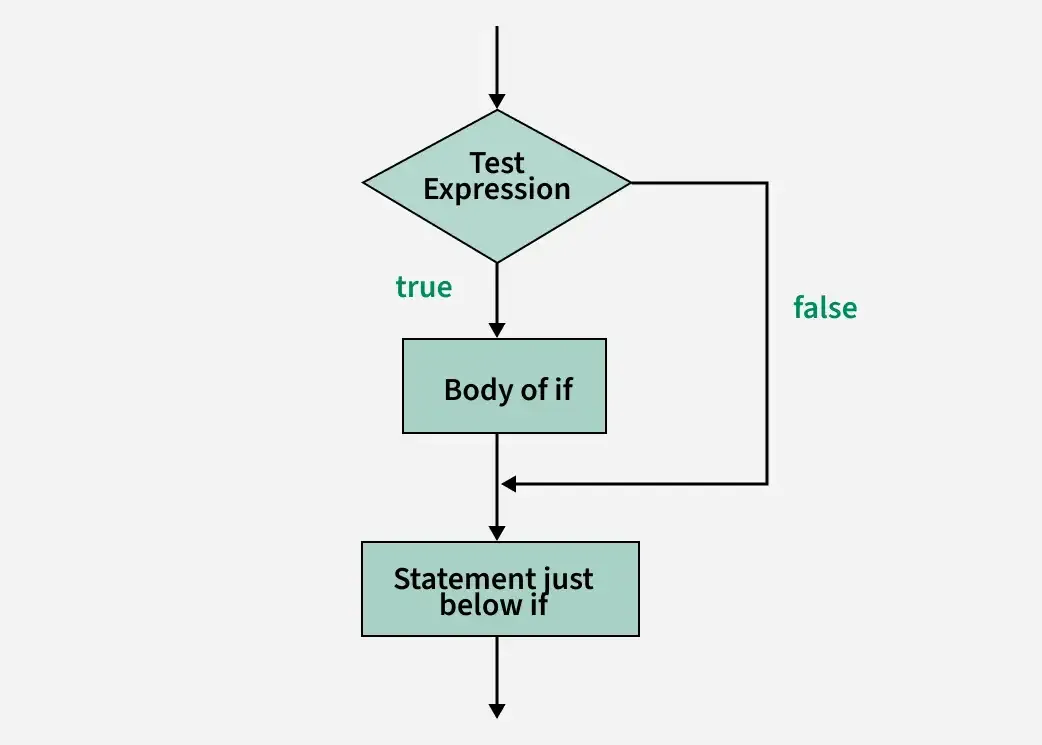
The Java program below demonstrates that if the condition is true, the code inside the curly braces will execute.
// file name: ifcondition.java
public class ifcondition{
    public static void main (String[] args) {
        int age = 20;
        if(age >= 18){ // here age 20 is greater than 18 so true and execute
            System.out.println("Eligible to vote");
        }
    }
}
Output
Eligible to vote
Explanation
The condition
ageevaluates Boolean valueIf the condition is
true, the code inside the curly bracket is executedIf the condition is
false, code will be skipped.
Java
if-elseStatement
- An
if-elsestatement is used to run a block of code when the condition in the if statement evaluates tofalse.
Syntax
if(condition){

// Executes this block if condition is true

} else {

// Executes this block if condition is false

}
if-else Statement Execution Flowchart
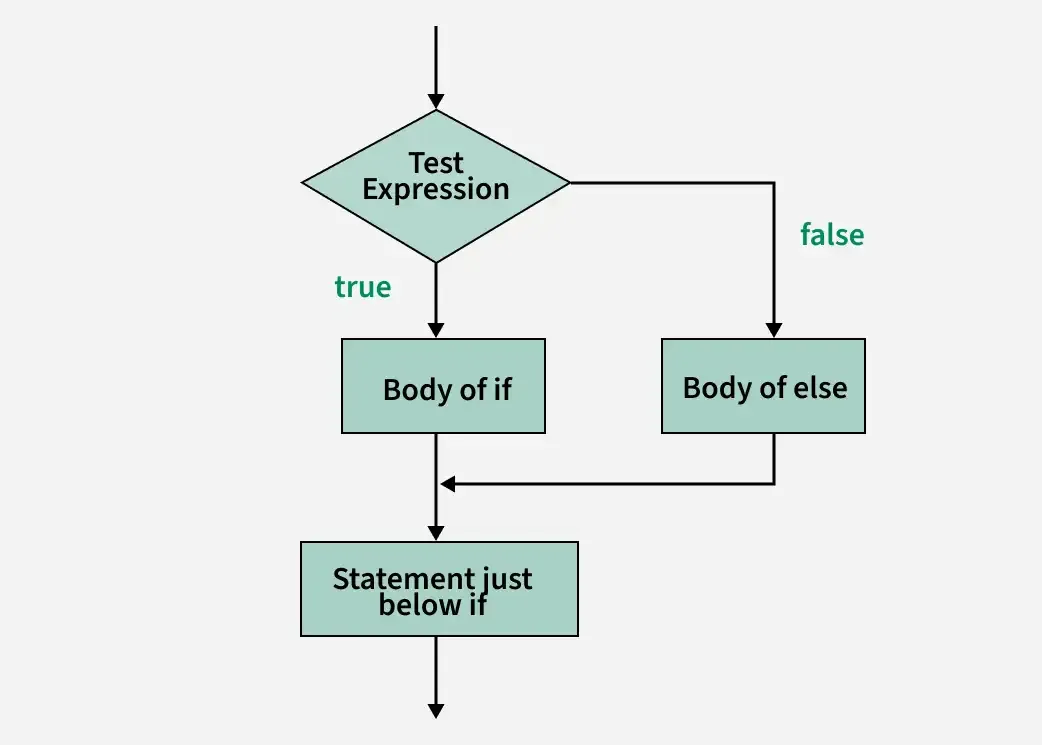
The below Java program demonstrates the use of the if-else statement to execute different blocks of code based on the condition.
// file name: ifelsecondition.java
public class ifelsecondition{
    public static void main (String[] args) {
        int age = 15;
        if(age >= 18){ // here age is less than 18 so if statement false and not execute
            System.out.println("Eligible to vote");
        } else { // here age is less than 18 so true else statement true and execute
            System.out.println("Not eligible to vote");
        }
    }
}
Output
Not eligible to vote
Explanation
The condition
ageevaluates Boolean valueIf the
ifstatement isfalse, the code inside the curly bracket is not executedIf the
elsestatement istrue, the code inside the curly bracket is executed
Java nested-if statement
- A
nested ifstatement means aifstatement inside anotherifstatement. To perform thesecond ifstatement, the condition of thefirst ifstatement must betrue.
Syntax
if (condition1) {

// Executes when condition1 is true or false

if (condition2)

{

// Executes when condition2 is true

}

}
nested-if Statement Execution Flow
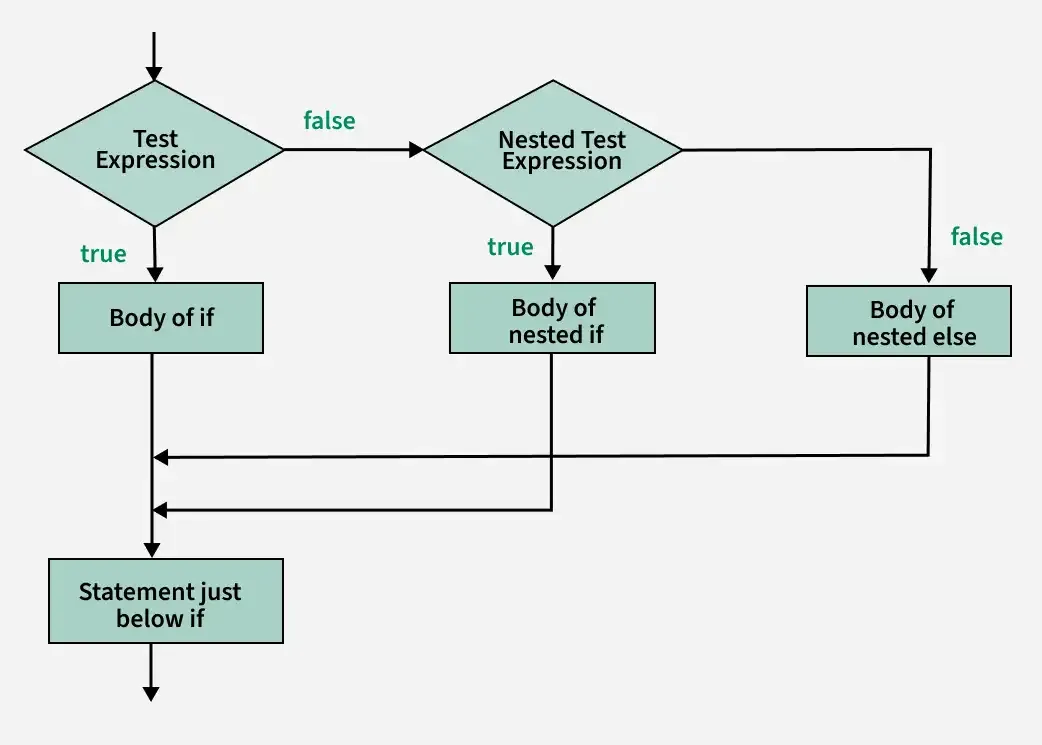
The below Java program demonstrates the use of nested if statements to check multiple conditions.
// file name: nestedif.java
public class nestedif{
    public static void main (String[] args) {
        int age = 25;
        boolean hasId = true;
        if(age >= 18){
            if(hasId){
                System.out.println("Access Granted");
            } else {
                System.out.println("Id required for verification");
            }
        } else {
            System.out.println("You must be 18+ to enter");
        }
    }
}
Output
Access Granted
Java if-else-if ladder
- The else-if statement is used to check multiple conditions in sequence when the previous if condition is false.
Syntax
if (condition1) {

// code to be executed if condition1 is true

} else if (condition2) {

// code to be executed if condition2 is true

} else {

// code to be executed if all conditions are false

}
if-else-if ladder Execution Flow
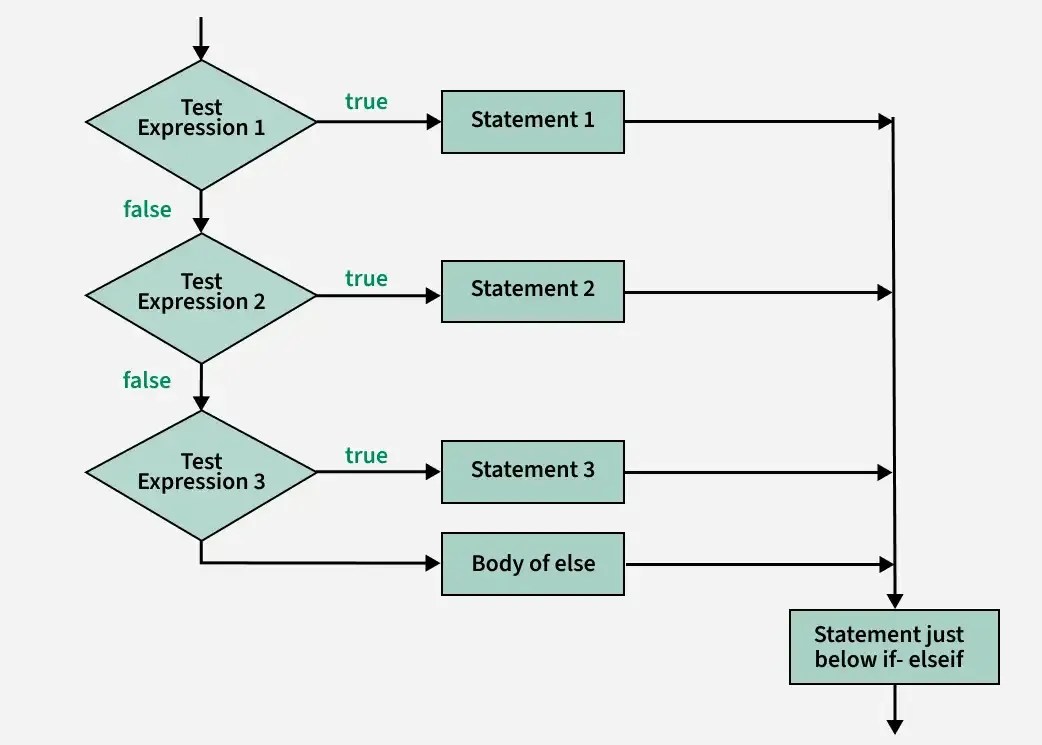
This example demonstrates an if-else-if ladder to check multiple conditions and execute the corresponding block of code based on the score grade.
// file name: ifelseif.java
public class ifelseif{
    public static void main (String[] args) {
        int score = 75;
        if(score >= 90){
            System.out.println("Grade A");
        }else if(score >= 80){
            System.out.println("Grade B");
        }else if(score >= 70){
            System.out.println("Grade c");
        }else{
            System.out.println("Grade D");
        }
    }
}
Output
Grade c
Java Switch case
In the switch case, depending on the variable value, that particular case will be executed. If the variable value doesn’t match any case, the default value will be executed.
In every case, we have to use the
breakkeyword. If we use thebreakkeyword, the program will terminate (stop) without executing the next line.
Syntax
switch (expression) {

case value1:

// code to be executed if expression == value1

break;

case value2:

// code to be executed if expression == value2

break;

// more cases...

default:

// code to be executed if no cases match

}
switch Statements Execution Flow

The below Java program demonstrates the use of the switch-case statement to evaluate multiple fixed values.
// file name: switchcase.java
public class switchcase{
    public static void main (String[] args) {
        int num = 2;
        switch (num) {
        case 1:
            System.out.println("Monday");
            break;
        case 2:
            System.out.println("Tuesday");
            break;
        case 3:
            System.out.println("Wednesday");
            break;
        case 4:
            System.out.println("Thursday");
            break;
        case 5:
            System.out.println("Friday");
            break;
        default:
            System.out.println("Weekend");
        }
    }
}
Output
Tuesday
The expression can be of type byte, short, int, char, or an enumeration. Beginning with JDK7, the expression can also be of type String.
Duplicate case values are not allowed.
The default statement is optional.
The break statement is used inside the switch to terminate a statement sequence.
The break statements are necessary; without the break keyword, statements in switch blocks fall through.
If the break keyword is omitted, execution will continue to the next case.
Jump Statement
Java supports three jump statements:
break,continueandreturn. These three statements transfer control to another part of the program.Break: In Java, a break is majorly used to terminate a sequence in a switch statement (discussed above) and to exit a loop.
Continue: continue keyword is used in a looping statement. it is used to skip the remaining code in the current iteration and continue the next iteration.
Return: The return statement is used to explicitly return from a method. That is, it causes program control to transfer back to the caller of the method.
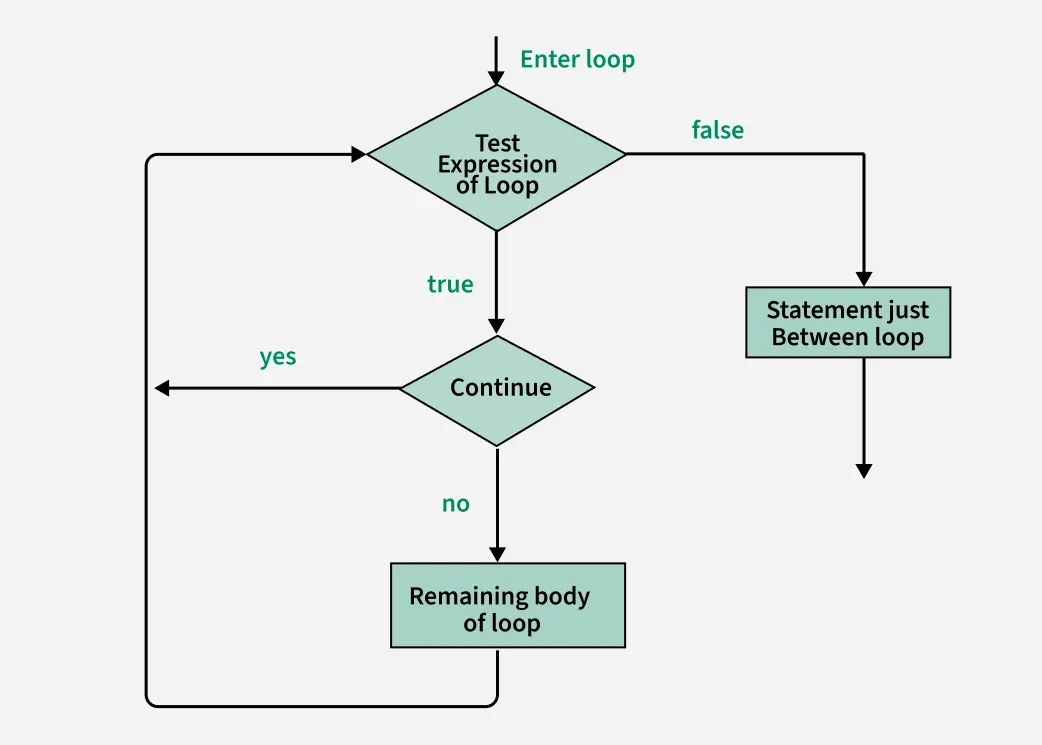
The Java program below demonstrates how the continue statement skips the current iteration when a condition is true.
// file name: jumpstatement.java
public class jumpstatement{
    public static void main (String[] args) {

        for (int i = 0; i < 10; i++) {

            // If the number is even
            // skip and continue
            if (i % 2 == 0){
                continue;
            }
            // If number is odd, print it
            System.out.print(i + " ");

        }
    }
}
Output
1 3 5 7 9
The below Java program demonstrates how the return statements stop a method and skips the rest of the code.
// file name: jumpstatement.java
public class jumpstatement{
    public static void main (String[] args) {

        boolean t = true;
        System.out.println("Before the return.");

        if (t){
            return;
        }
        // Compiler will bypass every statement
        // after return
        System.out.println("This won't execute.");
    }
}
Output
Before the return.
Happy Learning
Thanks For Reading! :)
SriParthu 💝💥


